

A machinist I worked with ran a five-axis CNC mill. He had spent twenty-two years on the floor. He could hear when a tool was about to fail. He knew which programs needed a warm-up cycle that wasn't in any manual. He had nudged feeds and speeds over thousands of hours until the machine performed better than its published tolerances.
You do not start by telling that person the workaround should go away. You watch. You ask questions. You learn what the work requires that no system has captured yet.
That is the posture AI should take with the rest of the business: understand the work before trying to replace the tools around it.
Workarounds are not failure
Enterprise technology often treats this as a tools problem. The familiar pitch is: your tools are outdated, your data needs cleanup, your processes need fixing, and a new system will handle it.
You hear versions of this in every transformation: get off Excel; if it is not in the enterprise resource planning (ERP) system, it does not count; clean the data before AI can touch it.
Meanwhile, the people doing the actual work have been quietly building the tools they need. They need to answer a customer, close the month, schedule a line, ship a part, or make a decision before the official system catches up.
That is why shadow IT keeps showing up in large organizations. It is not always rebellion or laziness. Often, it is an organization solving problems faster than its official systems can.
Excel as signal
Excel, PowerPoint, and Word are ubiquitous because they are freeform. They do not force a process. They do not require a six-month implementation, a certified admin, or a data migration project. You open them, and they do what you need.
That flexibility has tradeoffs. A workbook may lack structure, audit trail, or governance. But those weaknesses are only half the story. Freeform tools let people build the missing layer quickly. They can model an exception, test a process, share a view of the work, and make a decision while the official system is still waiting on a request queue.
When a workaround shows up, treat it as a signal. Three patterns we see again and again:
Finance reports. The ERP holds the transactional data; every report and every pivot gets built in Excel. People work backwards: export, paste, format, model, present. When something breaks, the standard pushback is "use the ERP the way it is meant to be used." Better question: what does the finance team need to do that the ERP does not make easy?
Scheduling. The ERP has a material requirements planning (MRP) module. MRP runs. Then the actual production schedule gets exported to Excel for finalization, because the fine-tuning, the constraint juggling, and the "this week we have to flex around the new hire" judgment do not always fit inside the model. The Excel layer is where the final schedule gets made.
Linked workbooks. A shared drive may hold linked workbooks, VBA macros nobody touches in case they break, and a spreadsheet that pulls from three others, which pull from two more, which pull from a flat file the night-shift supervisor updates manually. From the outside it can look chaotic. From the inside, it may be a working production system holding together local knowledge and process nuance that no ERP module ever asked about.
Three examples. One pattern. The workaround is carrying work the official system could not carry on its own.
Why rip and replace disappoints
The usual strategy is to rip out the old thing, install the new thing, and mandate adoption. Sometimes replacement is necessary. The problem is sequencing.
When replacement starts with the system instead of the work, it misses the judgment, exceptions, and handoffs that made the workaround necessary. Then the pattern repeats: impose a system from the top down, ask people to change how they work, watch adoption stall, and blame the users.
What if the users are showing you the missing requirements?
A different posture
Change management practice keeps returning to the same point: adoption depends on how the change is introduced, not only on the quality of the tool. People need to see their work in the system before they trust it.
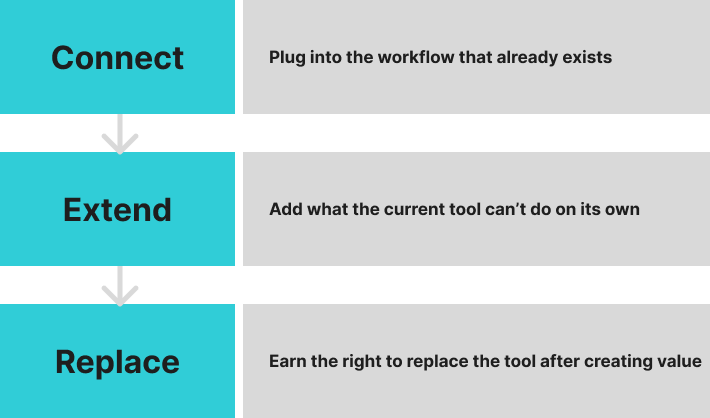
We think about the work in three stages. Less as a slide framework, more as a sequence for earning trust:
Connect. Plug into the workflow that already exists. The Excel model, the emailed report, the homegrown tracker. Do not ask anyone to stop what they are doing. Start where the work happens.
Extend. Add what the current tool cannot do on its own. Traceability. Collaboration. AI that reflects the user's expertise and helps others apply it. The existing workflow gets more useful without anyone learning a new system first.
Replace. Eventually, the user may stop needing the workaround. Not because it was removed by mandate, but because the system understands the work well enough that the next spreadsheet does not have to get built. Replacement comes last.
Workflows as evidence
Every workaround is evidence about how the work runs. The Excel pivot a finance team rebuilds every week says something about the ERP reporting module. The scheduler's annotated PDF says something about MRP. The night-shift handoff document, the unofficial vendor whitelist, the "ask Carla before you touch this" rule: these are part of the operating model people use day to day, layered on top of the system the company bought.
That layer is collective. It crosses people, handoffs, tools, and shifts. No single person owns it. When you read the workarounds, you are reading the workflow the organization runs on, even though no one wrote it down that way.
A 2023 NBER study by Brynjolfsson, Li, and Raymond looked at customer-service teams that gave AI access to their top performers' interactions. Novice productivity improved materially, especially for less experienced workers. The AI mirrored how the team's best work was already happening and made it available to more people.
That is the model we believe in. Read the workflow that already exists. Reflect its patterns. Make them available to the next shift, the next hire, the next role rotation. The goal is not to replace the judgment already in the building. It is to help more of the organization benefit from it.
The practical takeaway
The next time someone tells you to get off Excel, or that your data needs to be clean before AI can touch it, or that your workarounds need to be eliminated, do not start with elimination. Start with questions: Why did this workaround appear? Who depends on it? What judgment does it capture? Which handoffs does it protect?
Some workarounds should become formal systems. Some should stay lightweight. Some should disappear once a better workflow exists. The point is to understand them before replacing them.
Build AI that respects the way people work, reduces manual glue, and scales good judgment without pretending the people were the problem.